Re: [Sasview-users] Extraction of form and structure factor

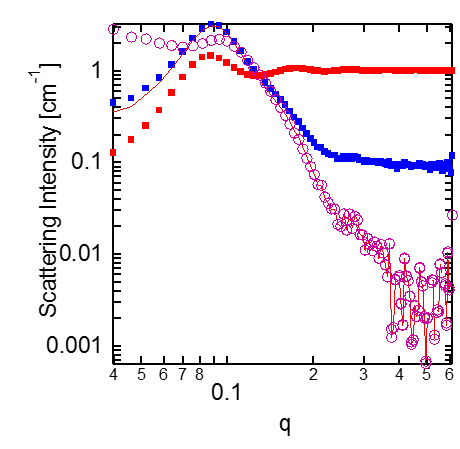
Dear Marco Richard is pointing to a new feature that should be in release 4.1 – it was added at the last Code Camp (in October), which was after the version 4 release. The separated form and structure factors will then appear in the Data Explorer under the data set you have fitted, similarly to how the fitted curve and residuals appear now (see screen shot). We are aiming to have the 4.1 release out in early 2017. Best Andrew ______________________________________ Andrew Jackson Instrument Scientist - Small Angle Scattering European Spallation Source, P.O Box 176, SE-221 00 Lund, Sweden Adjunct Associate Professor (Adjungerad Lektor) Physical Chemistry, Lund University, P.O. Box 124, SE-221 00, Lund, Sweden Phone: +46 46 888 3015 Mobile: +46 72 179 2015 E-mail: a<mailto:andrew.jackson@...631...>ndrew.jackson@...631... www.esss.se From: Richard Heenan <richard.heenan@...8...<mailto:richard.heenan@...8...>> Reply-To: Mailing list for users of SasView <sasview-users@...632...e.net<mailto:sasview-users@lists.sourceforge.net>> Date: Thursday 24 November 2016 at 13:44 To: "m.adamo15@...625...<mailto:m.adamo15@...625...>" <m.adamo15@...625...<mailto:m.adamo15@...625...>>, "users@...2...<mailto:users@...2...>" <users@...2...<mailto:users@...2...>> Subject: Re: [Sasview-users] Extraction of form and structure factor Dear Marco, Yes alas version 3 of sasview does not make it easy to save the S(Q). I suspect here that you have not allowed for the fitted flat background, which you will need to subtract, or set to zero and recalculate, before doing the division. In the new version 4 of sasview, the separate P(Q) and S(Q) are supposed to appear in the data structure on the left of the screen along with the total fit. I only say “supposed” in that in some of our very recent builds some other changes made this new feature disappear, and without going to look I am not sure of the current status on the public downloads. Hope this helps Richard Heenan From: Adamo, Marco [mailto:m.adamo15@...625...] Sent: 24 November 2016 11:13 To: users@...2...<mailto:users@...2...> Subject: [Sasview-users] Extraction of form and structure factor Dear SasView team, I have some corrected SANS data that I am fitting with SasView. The system is SDS 10% in 90% D2O/20% H2O v/v (file 093220_230). I was able to fit it with "EllipsoidModel”, “HayterMSAStructure” (file M2[093220_230_out.txt). Could you please explain me how to extract the structure and form factor? What I tried was to: 1. Fit the data with the above mentioned model 2. Remove the structure factor (just by deselecting it in SasView) to obtain ONLY the form factor (no more fit was performed, only the calculation) 3. Save the curve that is supposed to be a form factor 4. Divide the original data by the form factor to get the structure factor If I do the other way round, so I fit the data, remove the form, fix the structure factor (RED) and from it I get the form (PURPLE CIRCLES) by dividing the original data (BLUE) by the structure, I get this curve: [cid:image001.png@...629...] The problem is that I do not see any realistic form factor, as the structure is not completely removed at low q. Do you have any suggestions, please? Thanks, Marco
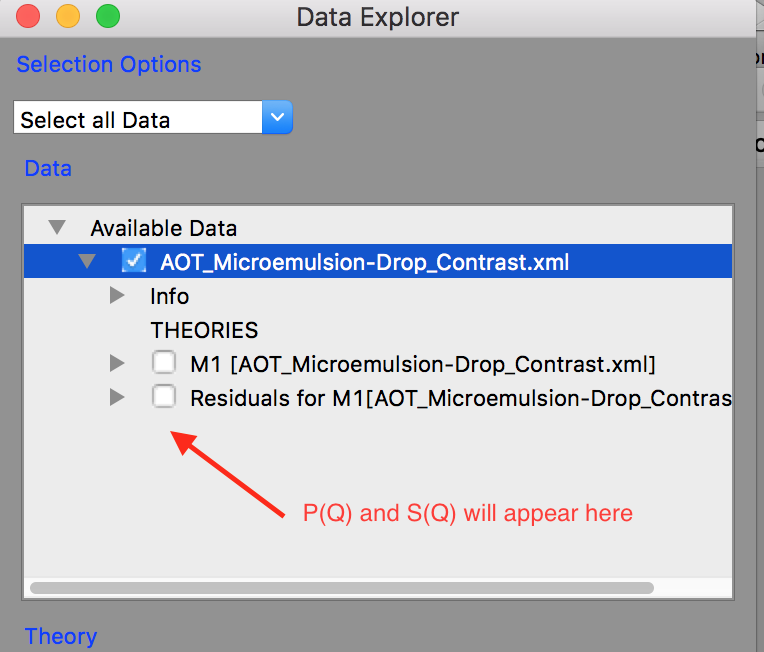

Hi Marco, In the meantime, if I understand your question, the way I do it is to do the fit as you do. Then go to the toolbar and click on "copy parameter" icon. Then open two new fit pages (Fitting -> New Fit Page) in the first load the ellipsoid model and the second the MSA structure factor. in each use the "paste parameter" icon to load the relevant parameters of your actual fit. Depending on your version you may need to adjust - for example in 4.01 scale is set to 1 in the P*S with vol fraction specified once. Since there is no vol frac parameter in form factors currently scale will be one but should in fact be set to your volume fraction (of course). The real annoyance is the effective radius in 4.01 which is NOT listed in the P*S but is calculated behind the scenes. In other versions it does show up and I believe will in 4.1. For a sphere is pretty easy .. for other shapes a bit more painful. Anyway once that is done you will see M2 and M3 (or some other number if you've done other things) in the theory box (see the graphic Andrew sent). just check both of those (and make sure all other data or theories are UNchecked of course) then sent to plot of the graph# that has your data and fit on it. You should now have I think what you are looking for? This part is what you will have to do also in 4.1. The difference being you won't have to create the 2 fit pages to get here... or potentially have to deal with missing parameters :-) Hope this helps Paul
participants (2)
-
 Andrew Jackson
 -
 Paul Butler